You push VC B from VC A, then tap Back. A is visible again, but B’s deinit message never appears. Something may still be keeping B alive. Start by checking what owns it after the navigation transition has finished.
The example uses two screens and one stored callback. Follow B in Xcode’s Memory Graph after returning to A, then use Instruments to check what remains after repeated navigation.
Start with two screens
Put A inside a UINavigationController. A opens B with an ordinary push:
final class ViewControllerA: UIViewController {
    func openB() {
        navigationController?.pushViewController(
            ViewControllerB(), animated: true
        )
    }
}

final class ViewControllerB: UIViewController {
    var onUpdate: (() -> Void)?

    override func viewDidLoad() {
        super.viewDidLoad()

        onUpdate = {
            self.title = "VC B"
        }
        onUpdate?()
    }

    deinit {
        print("VC B deallocated")
    }
}
Run the app, open B, then use the navigation bar’s Back button. Wait for the pop animation to finish. A missing deinit message is a reason to investigate. On its own, it does not identify the owner or prove a retain cycle.
Follow the callback in Memory Graph
With A visible again, select Debug Memory Graph in Xcode. Filter for ViewControllerB, choose the remaining instance, and inspect its references. The relevant chain is:
ViewControllerB → onUpdate.context → Closure context → [capture] → ViewControllerB
Focus on the closure context to see the callback’s captured object. In this lab’s live capture, Xcode showed both onUpdate.context and the [capture] reference back to B. Keep the instance address visible when checking the chain so that repeated type names do not look like unrelated objects.
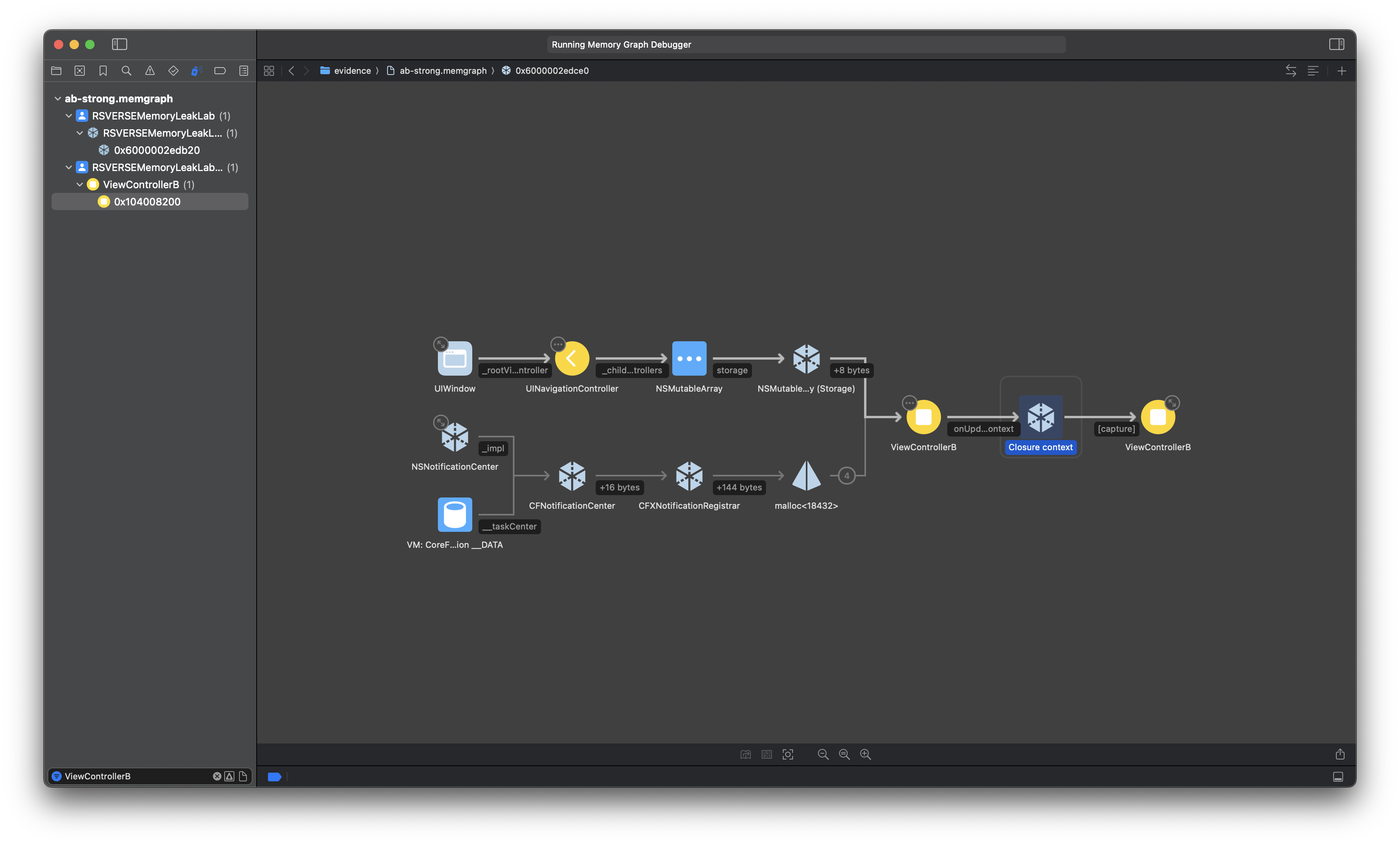
onUpdate.context to the closure context, then [capture] back to the same B instance. Other framework paths are also visible. Open full-size screenshot.This path explains why B survives. B owns onUpdate, and the closure captures B strongly. The callback runs once, but B continues to store it afterward. Returning to A removes B from the public navigation stack; the callback cycle keeps B alive.
Change the callback’s capture
This callback only updates its screen. It does not need to extend the screen’s lifetime, so change the closure to:
onUpdate = { [weak self] in
    self?.title = "VC B"
}
Run the same navigation again. B’s title should still update while B is visible. After Back completes, the deallocation message should appear and a fresh Memory Graph should contain no B instance.
Repeat the navigation with marked generations
Use Instruments Allocations to check whether repeated navigation leaves additional B instances behind. Profile the same build configuration for both modes. First do one weak-capture push/pop to warm up navigation, wait until A is visible, and select the lab’s Release retained B instances button to reset its observation probes. Select Mark Generation to establish the baseline.
Then push B and return to A three times, waiting for each transition to finish. Mark another generation and stop recording. Expand the generation created after the baseline and filter for ViewControllerB. Repeat from a fresh application launch using the weak-capture version.
| Capture | Push/pop cycles after warm-up | B instances still alive |
|---|---|---|
| Strong | 3 | 3 |
| Weak | 3 | 0 |
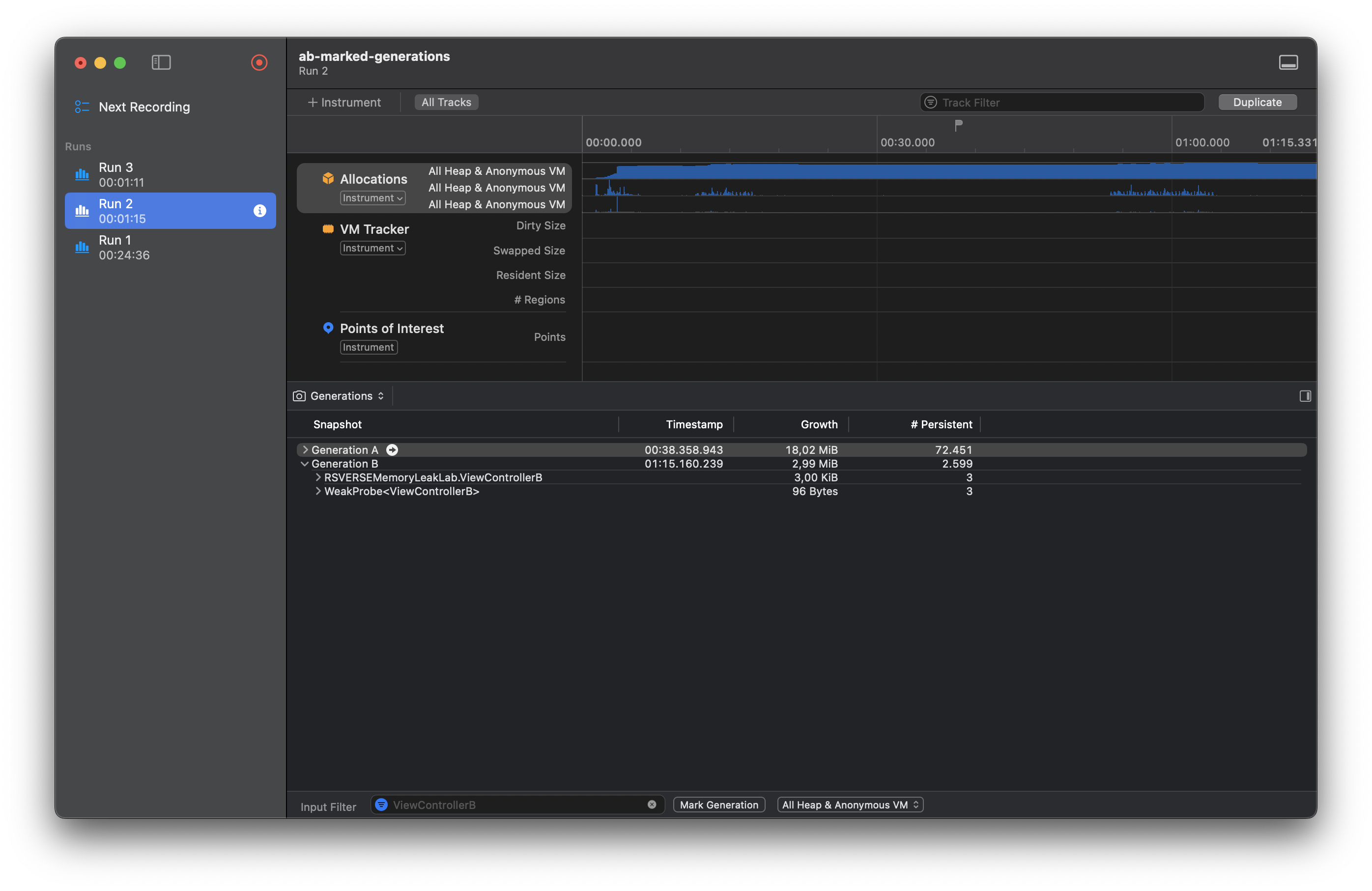
RSVERSEMemoryLeakLab.ViewControllerB objects. The separate weak-probe row is observation bookkeeping. Open full-size screenshot.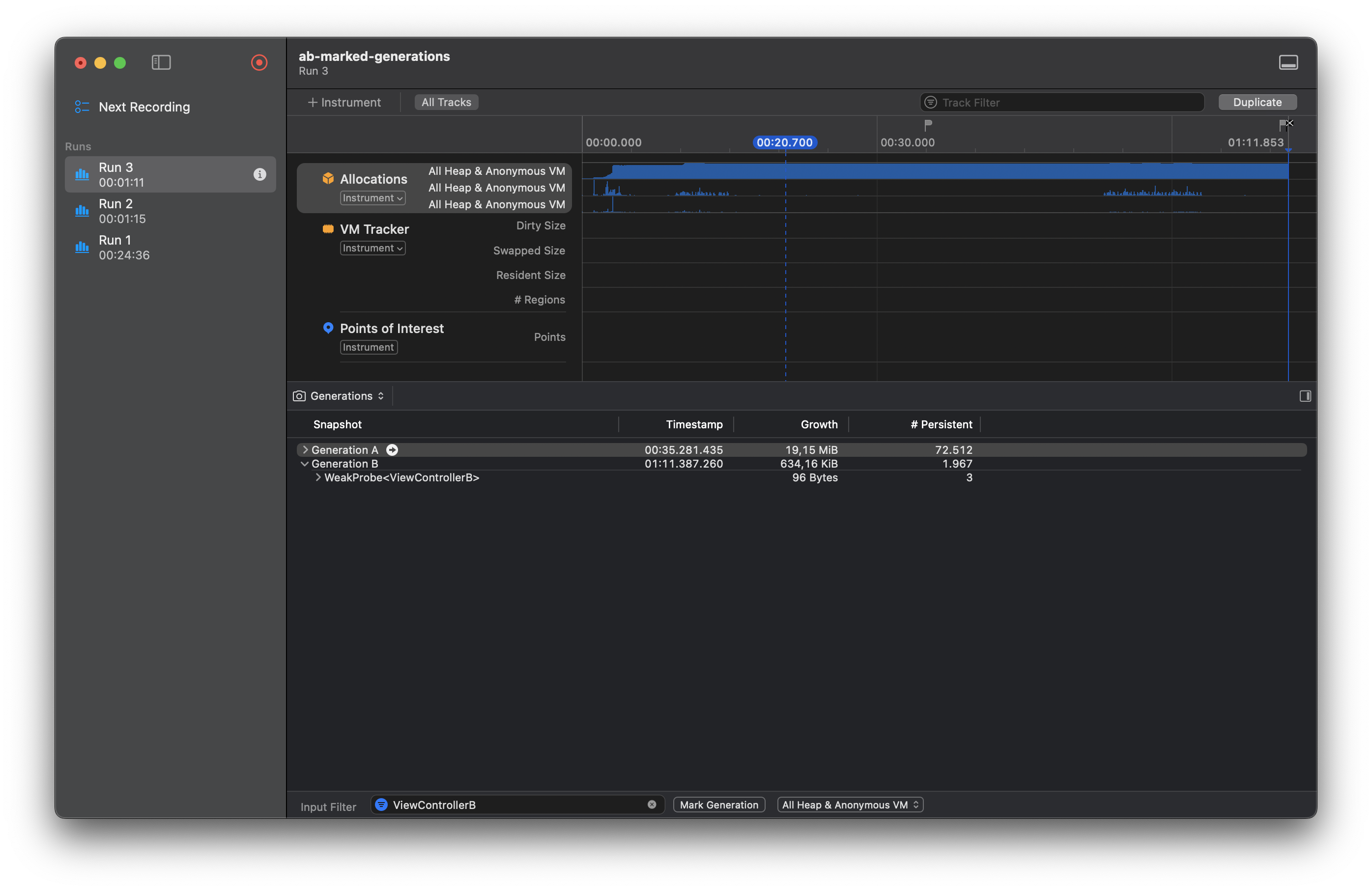
WeakProbe<ViewControllerB> entries remain, but each holds B weakly. Open full-size screenshot.Prove the fix after Back
After the change, repeat the same navigation. B’s callback should still work while the screen is visible. After Back, confirm that B deallocates and repeated push/pop cycles leave no B instances behind.