
I used to think notification permission and APNs registration were basically one process. I deleted and reinstalled the app several times so I could test each permission state from the beginning. That was when I noticed that denying permission did not prevent the registration callback from succeeding. Then I checked UNNotificationSettings: registration had succeeded, but alerts, sounds, and badges were disabled. Since then, I have stopped treating “the notification didn’t appear” as one problem. Now I check authorization, registration, delivery, payload validation, routing, and presentation separately.
When someone says a push notification is broken, I first ask what actually failed. Did registration fail? Did APNs reject the request? Did the device receive it but decide not to show a banner?
I work through the pipeline in this order: identity → entitlement → permission → registration → token handoff → provider request → APNs response → presentation. I do not change the payload until I have evidence that the earlier layers are working.
Keep one record for each push attempt
For each test push, I keep one record with the build, bundle ID, APNs environment, device OS, token fingerprint, request time, apns-id, response status, APNs reason, and app state. I derive the fingerprint from a one-way hash and never put the complete device token in diagnostics.
That lets me say, “APNs returned 200 for build 42 while the app was in the foreground,” instead of, “It did not work yesterday.”
1. Check the app identity and APNs environment
- The installed app’s bundle identifier matches the provider’s
apns-topic. - The signed app contains the
aps-environmententitlement. - Development tokens are sent to the sandbox endpoint; distribution tokens use production.
- The authentication key belongs to the expected Apple developer team and is still active.
Inspect the built app, not only the Xcode project setting. A correct project file does not prove the archive was signed with the expected profile.
2. Treat permission and registration as separate checks
Notification authorization controls alerts, sounds, and badges. Remote-notification registration obtains an APNs device token. Track both outcomes:
import UIKit
import UserNotifications

@MainActor
func configureNotifications() async {
    let center = UNUserNotificationCenter.current()

    do {
        let granted = try await center.requestAuthorization(
            options: [.alert, .badge, .sound]
        )
        diagnostics.recordAuthorization(granted: granted)
    } catch {
        let nsError = error as NSError
        diagnostics.recordAuthorizationFailure(
            domain: nsError.domain,
            code: nsError.code
        )
    }

    UIApplication.shared.registerForRemoteNotifications()
}
When I ask for permission
I do not use the same timing for every product. If notifications are essential to the main experience, I explain their value early. If they support an optional feature, I wait until the user reaches that feature or performs an action that makes the request understandable. The permission prompt should have a clear reason when it appears.
If the user denies permission, the app should continue working normally. I would not treat that decision as an application error or keep asking on every launch. When the user later opens a feature that needs notifications, the app can explain what is unavailable and provide a clear way to open notification settings.
For diagnostics, I prefer recording what helps answer the next debugging question. Each event should identify the pipeline stage, outcome, app state, build environment, and a privacy-safe correlation identifier. That is usually enough to narrow the problem without collecting notification content or a complete device token.
Permission controls user-facing alerts, sounds, and badges. APNs registration gives the app a device token. In practice, I check UNNotificationSettings for the permission state and the app-delegate callbacks for registration. I do not use one result to guess the other.
I ask the system for the current device token on every launch. Apple treats the token as variable data tied to an app-device combination, so I do not use a cached token as a permanent installation identifier.
3. Follow the token from the app to the server
func application(
    _ application: UIApplication,
    didRegisterForRemoteNotificationsWithDeviceToken deviceToken: Data
) {
    let token = deviceToken.map { String(format: "%02x", $0) }.joined()
    tokenUploader.replaceToken(token)
}

func application(
    _ application: UIApplication,
    didFailToRegisterForRemoteNotificationsWithError error: Error
) {
    diagnostics.recordRegistrationFailure(error)
}
Keep the installation separate from the account
The mistake I guard against is leaving a device token connected to the wrong account. A device can sign out and another person can sign in, while the APNs token still belongs to the same app installation. If the backend treats that token as permanent user data, a notification could be routed to the wrong person.
The backend should update the relationship between the installation and the signed-in account. During sign-out, I would detach the installation from the previous account before another user can inherit it. After sign-in, the backend can associate the current installation with the new account and its notification preferences.
For token diagnostics, I record the registration time, APNs environment, app build, registration outcome, and a sanitized error code when registration fails. I do not need the complete device token in shared logs to understand whether registration worked.
On the server, store the token with the app, environment, installation, last-seen build, and last successful update time. Replace an old token when registration returns a new one. Never print full tokens in shared logs or analytics.
4. Send one known-good provider request
For a controlled test, I would reduce the provider request to this minimal alert and a small set of explicit headers. The placeholders are intentional; this is not a credential script:
curl --http2 \
  --header "authorization: bearer <SIGNED_JWT>" \
  --header "apns-topic: dev.rsverse.PushLab" \
  --header "apns-push-type: alert" \
  --header "apns-priority: 10" \
  --header "apns-id: <NEW_UUID>" \
  --dump-header apns-response-headers.txt \
  --write-out '\nHTTP status: %{http_code}\n' \
  --data '{"aps":{"alert":{"title":"Push Lab","body":"Controlled delivery test"}}}' \
  https://api.sandbox.push.apple.com/3/device/<DEVICE_TOKEN>
Use a current provider JWT and reuse it instead of generating a new one for every request. Do not refresh it more often than once every 20 minutes. Keep the private key outside the repository, and do not paste credentials into shell history. Capture the HTTP status, response headers such as apns-id, and the error body when present, without retaining credentials or the complete device token.
5. Read the APNs response before changing app code
- 200: APNs accepted the request. The response body is empty, and acceptance does not prove a banner appeared.
- 400: inspect the returned reason, topic, headers, token, and JSON payload.
- 403: inspect provider authentication, key access, team, and topic authorization.
- 410: stop sending to that token for this topic and environment; use the response timestamp when reconciling installation state.
- 429 / TooManyRequests: delay the retry and apply bounded backoff instead of retrying immediately.
- 429 / TooManyProviderTokenUpdates: stop regenerating the provider JWT so frequently, correct the refresh cadence, and then retry.
- 5xx: wait 15 minutes before retrying the payload, then use bounded backoff if APNs remains unavailable.
Retain the HTTP status and response apns-id with every diagnostic attempt, plus the APNs error reason when a body is present. These fields join the provider request to later investigation even when a successful response has no body.
6. Check whether iOS delivered or presented it
A foreground app usually needs a notification-center delegate decision before an alert is presented. Install the delegate before the app finishes launching, then make the presentation decision explicitly:
func application(
    _ application: UIApplication,
    didFinishLaunchingWithOptions launchOptions: [UIApplication.LaunchOptionsKey: Any]?
) -> Bool {
    UNUserNotificationCenter.current().delegate = self
    return true
}

extension AppDelegate: UNUserNotificationCenterDelegate {
    func userNotificationCenter(
        _ center: UNUserNotificationCenter,
        willPresent notification: UNNotification
    ) async -> UNNotificationPresentationOptions {
        diagnostics.recordForegroundDelivery(notification.request.identifier)
        return [.banner, .sound]
    }
}
If APNs accepted the request but no banner appeared, check authorization state, Focus settings, Notification Summary, foreground behavior, app state, and whether the payload is a background update rather than an alert. A force-quit app also changes what background work can occur.
Failures I check first
- A sandbox token sent to the production endpoint.
- A token from a previous installation reused after reinstall.
- The provider topic differs from the signed bundle identifier.
- A valid request uses the wrong push type or omits required payload keys.
- Only the authorization callback is logged; APNs registration is never observed.
- A foreground delivery is mistaken for a delivery failure because no banner policy was returned.
- Provider code discards the APNs status, response headers, and error body, then retries blindly.
Change one variable at a time
Test one variable at a time: sandbox then production; foreground, background, then terminated; alerts allowed then denied; Wi-Fi then cellular; current token then a deliberately invalid token. Record each row. Do not mix a new build, new provider key, new payload, and new network in one attempt.
What the lab proves—and what it does not
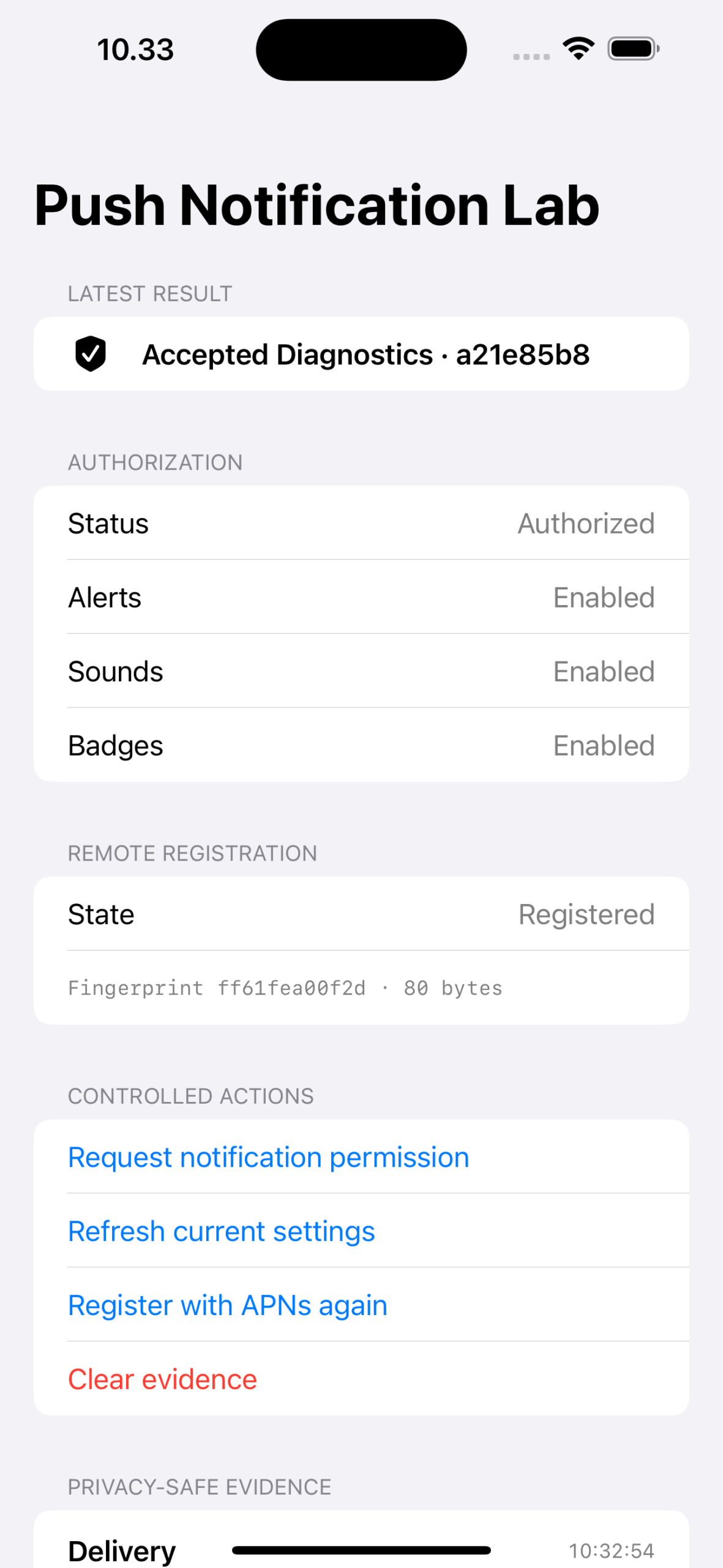
The lab has a narrow job. It tests authorization state, registration timing, payload validation, routing, and privacy-safe diagnostics without using a production endpoint, provider credential, client payload, or complete device token. Its thirteen tests verify that the first registration attempt waits for an authorization decision, that later authorized and denied states can proceed to registration, and that malformed routing metadata is rejected without navigation.
In my current simulator run, the app refreshed an authorized state before registration, reached the registration success callback, and accepted a valid foreground fixture. An earlier controlled reinstall showed the other important case: permission was denied, but registration still succeeded.
I have not verified provider authentication, an APNs HTTP response, physical-device delivery, production behavior, Focus behavior, or the installed entitlement of a signed release build. Those paths require an enrolled developer account and a physical-device APNs test. The article does not claim otherwise.
Before release
- Inspect entitlements in the archived app.
- Confirm token refresh reaches the correct environment-specific store.
- Send a minimal alert and retain the status, response headers,
apns-id, and error reason when present. - Test foreground, background, and terminated presentation on a physical device.
- Test token invalidation and provider cleanup.
- Verify logs and crash reports do not expose tokens, keys, or notification content.
Primary sources
- Apple: Developer Program membership details
- Apple: Asking permission to use notifications
- Apple: Requesting notification authorization
- Apple: Registering for remote notifications
- Apple: Registering your app with APNs
- Apple: Setting up a remote notification server
- Apple: Establishing a token-based connection to APNs
- Apple: Sending notification requests to APNs
- Apple: Handling notification responses from APNs
- Apple: UNUserNotificationCenterDelegate
- Apple: Generating a remote notification